Microsoft ES4649 Uživatelský manuál Strana 252
- Strana / 674
- Tabulka s obsahem
- ŘEŠENÍ PROBLÉMŮ
- KNIHY

- Powered by Accton 1
- Gigabit Ethernet Switch 3
- F3.1.1.21 E042005-R01 4
- 149100022900A 4
- Contents 22
- Chapter 1: Introduction 31
- Introduction 32
- System Defaults 36
- Connecting to the Switch 41
- Required Connections 42
- Stack Operations 43
- Selecting the Backup Unit 44
- Renumbering the Stack 45
- Stack Limitations 45
- Basic Configuration 46
- Setting Passwords 47
- Setting an IP Address 47
- Initial Configuration 48
- Dynamic Configuration 48
- Trap Receivers 50
- Saving Configuration Settings 51
- Managing System Files 52
- Using the Web Interface 53
- Home Page 54
- Configuration Options 55
- Panel Display 55
- Main Menu 56
- Manual Configuration 70
- Using DHCP/BOOTP 71
- Managing Firmware 72
- Console Port Settings 77
- Telnet Settings 79
- Configuring Event Logging 81
- Remote Log Configuration 82
- Displaying Log Messages 84
- Resetting the System 87
- Setting the System Clock 87
- Setting the Time Zone 88
- Figure 3-24 Clock Time Zone 89
- Enabling the SNMP Agent 91
- Setting a Local Engine ID 95
- Specifying a Remote Engine ID 95
- Configuring SNMPv3 Users 96
- Configuring the Switch 100
- Configuring SNMPv3 Groups 100
- Setting SNMPv3 Views 104
- User Authentication 105
- Configuring HTTPS 110
- Configuring the Secure Shell 112
- Generating the Host Key Pair 113
- Configuring the SSH Server 115
- Configuring Port Security 117
- Displaying 802.1X Statistics 124
- Access Control Lists 128
- Setting the ACL Name and Type 129
- Configuring a Standard IP ACL 129
- Configuring a MAC ACL 133
- Configuring ACL Masks 135
- Configuring an IP ACL Mask 136
- Configuring a MAC ACL Mask 138
- Port Configuration 140
- Creating Trunk Groups 145
- Configuring LACP Parameters 149
- Displaying LACP Port Counters 152
- Configuring Port Mirroring 158
- Configuring Rate Limits 159
- Showing Port Statistics 160
- Address Table Settings 164
- Displaying the Address Table 165
- Changing the Aging Time 167
- Displaying Global Settings 168
- Configuring Global Settings 171
- Displaying Interface Settings 175
- Settings,” page 3-123 181
- VLAN Configuration 187
- VA: VLAN Aware 188
- VU: VLAN Unaware 188
- Displaying Current VLANs 191
- Creating VLANs 192
- Configuring Private VLANs 198
- Configuring Protocol Groups 200
- Mapping Protocols to VLANs 201
- Layer 2 Queue Settings 202
- Figure 3-87 Traffic Classes 205
- Selecting the Queue Mode 206
- Layer 3/4 Priority Settings 208
- Mapping IP Precedence 209
- Mapping DSCP Priority 210
- Mapping IP Port Priority 212
- Quality of Service 213
- Configuring a Class Map 214
- Creating QoS Policies 217
- Multicast 221
- Multicast Filtering 223
- L3 - network core 229
- Displaying the DNS Cache 237
- Console(config-if)# 239
- Configuring the DHCP Server 240
- Console# 241
- Configuring Address Pools 242
- Console(config-dhcp)# 243
- Displaying Address Bindings 246
- Master Router 247
- Backup Router 247
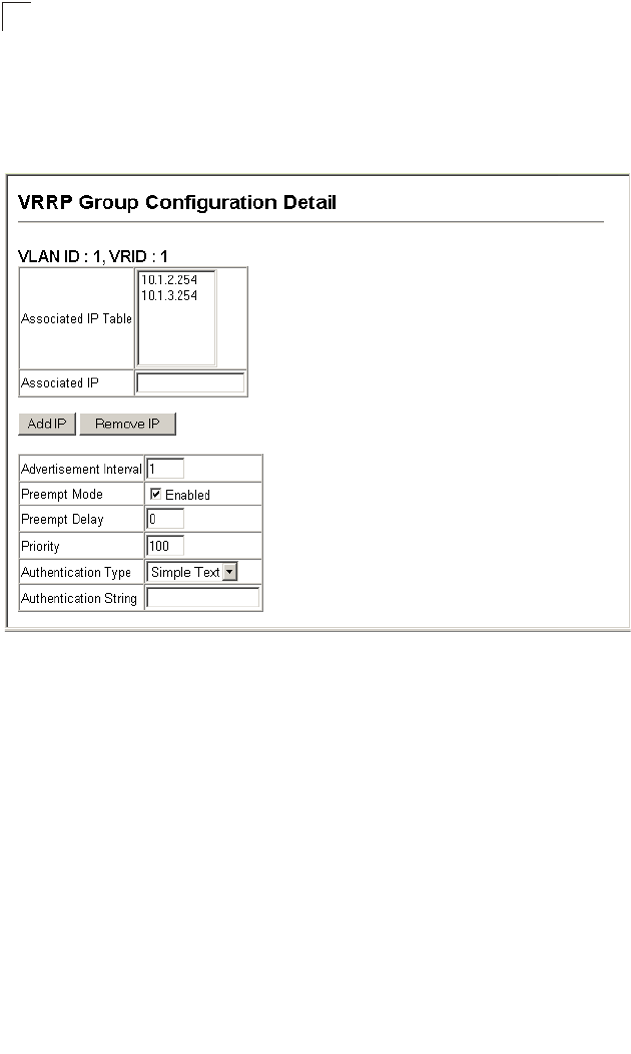
- Configuring VRRP Groups 248
- Configuring Router Redundancy 249
- IP Routing 256
- IP Switching 257
- Routing Path Management 258
- Routing Protocols 258
- Address Resolution Protocol 262
- Basic ARP Configuration 263
- Displaying Local ARP Entries 266
- Displaying ARP Statistics 267
- IP Statistics 268
- ICMP Statistics 270
- UDP Statistics 272
- TCP Statistics 273
- Configuring Static Routes 274
- Displaying the Routing Table 275
- Autonomous System A 286
- Autonomous System B 286
- Configuring OSPF Areas 290
- Configuring OSPF Interfaces 295
- Configuring Virtual Links 299
- Configuring NSSA Settings 306
- Multicast Routing 312
- Configuring DVMRP 316
- Configuring PIM-DM 323
- Accessing the CLI 329
- Console Connection 329
- Telnet Connection 329
- Command Line Interface 330
- Entering Commands 331
- Showing Commands 332
- Partial Keyword Lookup 333
- Using Command History 333
- Understanding Command Modes 334
- Exec Commands 334
- Configuration Commands 335
- Command Line Processing 337
- Command Groups 338
- Line Commands 339
- General Commands 348
- System Management Commands 353
- User Access Commands 355
- IP Filter Commands 357
- Web Server Commands 359
- Telnet Server Commands 362
- Event Logging Commands 371
- SMTP Alert Commands 377
- Time Commands 381
- System Status Commands 385
- Frame Size Commands 391
- Flash/File Commands 392
- Authentication Commands 398
- RADIUS Client 400
- TACACS+ Client 403
- Port Security Commands 406
- 802.1X Port Authentication 408
- Access Control List Commands 415
- IP ACLs 417
- MAC ACLs 427
- ACL Information 434
- SNMP Commands 435
- DHCP Commands 449
- DHCP Relay 451
- DHCP Server 452
- DNS Commands 464
- Interface Commands 471
- Mirror Port Commands 482
- Rate Limit Commands 484
- Link Aggregation Commands 485
- Address Table Commands 494
- Spanning Tree Commands 498
- 499
- VLAN Commands 516
- Configuring VLAN Interfaces 518
- Displaying VLAN Information 523
- Priority Commands 534
- Quality of Service Commands 546
- Multicast Filtering Commands 554
- IGMP Snooping Commands 555
- IGMP Commands (Layer 3) 562
- IP Interface Commands 569
- IP Routing Commands 577
- ip-address 593
- Multicast Routing Commands 623
- Router Redundancy Commands 642
- Software Features 653
- Management Features 654
- Standards 654
- Management Information Bases 655
- Software Specifications 656
- Appendix B: Troubleshooting 657
- Using System Logs 658
- Glossary 659
- Glossary-8 666
- E042005-R01 674
Související produkty a manuály pro Software Microsoft ES4649
 (72 stránky)
(22 stránky)
(84 stránky)
(130 stránky)
(142 stránky)
(16 stránky)
(14 stránky)
(72 stránky)
(22 stránky)
(84 stránky)
(130 stránky)
(142 stránky)
(16 stránky)
(14 stránky)
© 2020, manymanuals.cz. Všechna práva vyhrazena. | 0.032 s |
 Manymanuals.com
 Manymanuals.de
 Manymanuals.fr
 Manymanuals.it
 Manymanuals.pl
 Manymanuals.cz
 Manymanuals.es
 Manymanuals-pt.com
Komentáře k této Příručce